

Meet DeceptiTech
DeceptiTech is a fast-growing cyber security company specializing in honeypot development and deception technologies. At the heart of their success are DeceptiPots - lightweight, powerful, and configurable honeypots that you can install on any OS and capture every malicious action!
The internal DeceptiTech network is organized around a traditional on-premises Active Directory domain with approximately 50 active users. The product platform, however, is isolated and hosted entirely in the AWS cloud.
Lost in RAMslation
One ordinary morning, DeceptiTech’s entire network collapsed. Within minutes, all critical on-premises systems were locked down and encrypted. The IT department hurried to restore backups, while the security team rushed to their SIEM - only to find the backups corrupted and all SIEM data wiped clean.
This room is about the third attack stage. As part of an external DFIR unit, can you help DeceptiTech perform a full-scope investigation and explain how the attack started?
Analysis Approach
A memory dump that corresponds to the server SRV-DMZ-GW with the name SRV-DMZ-GW-evidence.mem is available at /home/ubuntu/. If you operate from the analyst account, use sudo to access the dump.
Credentials
- IP Address:
MACHINE_IP - Connection:
SSH or Split Screen - Username:
analyst - Password:
forensic
Tips and Tools
- Threat actors tend to mimic system applications.
- Volatility is installed in the analyst’s machine.
- Some output has been prefetched in
/home/ubuntu/out.
Environment & Evidence Prep
- Connect to the target lab over SSH:
ssh analyst@MACHINE_IP(passwordforensic). - This room did us the curiosity of having all of the relevant volatility dumps available at
/home/ubuntu/out. We would have had to spend a good amount of time running various volatility3 commands to collect these txt dumps individually. Regardless, I will go through this walkthrough showing what we could do here if we didn’t have all the volatility/out/ *.txtfiles already given to us. - Stage the memory image (
SRV-DMZ-GW-evidence.mem) in/home/ubuntuand make an output directory for Volatility exports:mkdir -p ~/out. - Run Volatility 3 modules against the image to collect artefacts mirroring the provided set:
vol.py -f SRV-DMZ-GW-evidence.mem windows.pstree.PsTree > ~/out/pstree.txtvol.py -f SRV-DMZ-GW-evidence.mem windows.cmdline.CmdLine > ~/out/cmdline.txtvol.py -f SRV-DMZ-GW-evidence.mem windows.malfind.Malfind > ~/out/malfind.txtvol.py -f SRV-DMZ-GW-evidence.mem windows.netscan.NetScan > ~/out/netscan.txt
Next, I copied the exported .txt files from $analysis@tryhackme via SSH to my local WSL Ubuntu box in /mnt/c/ctf/thm for ease of use:
scp analyst@10.201.6.251:/home/ubuntu/out/* tryhackme_out/

Now I have all of the logs that I need to do a proper forensic investigation, comfortably on my own machine 🤓
Questions 1 & 2 – Initial Payload Execution
Recreate the supporting Volatility exports if needed:
vol.py -f SRV-DMZ-GW-evidence.mem windows.pstree.PsTree > ~/out/pstree.txtvol.py -f SRV-DMZ-GW-evidence.mem windows.cmdline.CmdLine > ~/out/cmdline.txt- Inspect the process hierarchy to locate suspicious parent-child chains:
nl -ba tryhackme_out/pstree.txt | sed -n '20,40p'
- This highlights the PsExec service (
PSEXESVC.exe) spawningcmd.exe, which in turn launchesrundll32.exewith the argumentC:\Windows\Tasks\MicrosoftUpdate.dll, RunMe, pinpointing the first malicious payload.
- Validate the exact command line recorded for that process:
nl -ba tryhackme_out/cmdline.txt | sed -n '35,45p'- This is how we narrow a large dataset down to pinpoint exactly what we are looking for
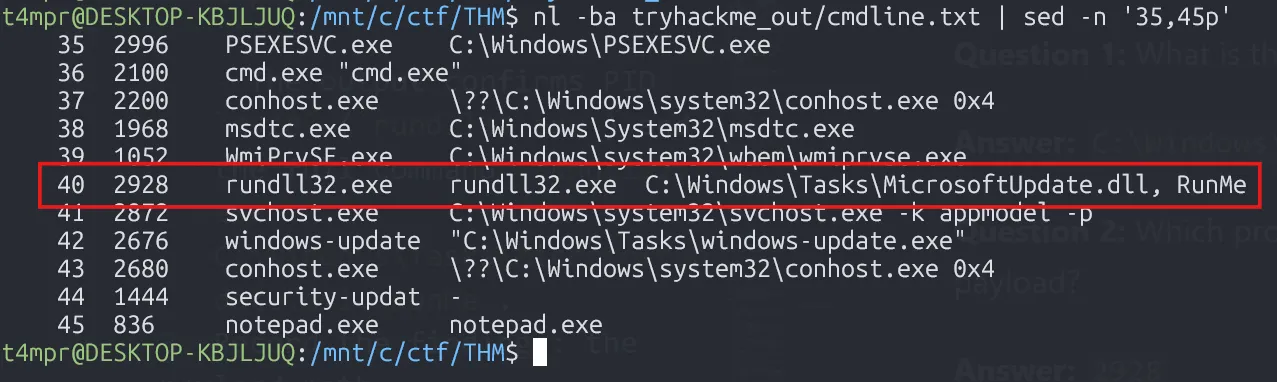
- The output confirms PID
2928(rundll32.exe) and the full commandrundll32.exe C:\Windows\Tasks\MicrosoftUpdate.dll, RunMe.
- Record the findings: the payload path (
C:\Windows\Tasks\MicrosoftUpdate.dll) and the executing process ID (2928).
Question 1: What is the absolute path to the initial malicious file executed on this host?
Answer: C:\Windows\Tasks\MicrosoftUpdate.dll
Question 2: Which process ID (PID) was assigned to the process used to execute the initial payload?
Answer: 2928
Question 3 – Command Line Execution
Generate the command-line listing if it is not already available:
vol.py -f SRV-DMZ-GW-evidence.mem windows.cmdline.CmdLine > ~/out/cmdline.txt- Filter the command-line dump for the suspicious
rundll32.exeinstance:
rg -n "rundll32.exe" tryhackme_out/cmdline.txt- The match shows the full command line captured from memory:
40:2928 rundll32.exe rundll32.exe C:\Windows\Tasks\MicrosoftUpdate.dll, RunMe
- Based on our analysis, we conclude that the answer is:
rundll32.exe C:\Windows\Tasks\MicrosoftUpdate.dll, RunMe.
Question 3: What was the full command line used by the attacker to launch initial execution on this host?
Answer: rundll32.exe C:\Windows\Tasks\MicrosoftUpdate.dll, RunMe
Question 4 – Final Process in the Chain
Regenerate the process tree if needed:
vol.py -f SRV-DMZ-GW-evidence.mem windows.pstree.PsTree > ~/out/pstree.txt- Revisit the process tree to map the execution sequence after the PsExec service was installed:
nl -ba tryhackme_out/pstree.txt | sed -n '24,36p'- The output shows the progression:
26 **** 2928 rundll32.exe ...27 ***** 2676 windows-update ...29 ****** 1444 security-updat ...30 ******* 836 notepad.exe ...
- Note that
notepad.exe(PID 836) is the last process started by the malicious chain before the attacker injected shellcode, so this is the final process name.
Question 4: The attack launched various processes. What is the name of the final process in the chain?
Answer: notepad.exe
Question 5 – Meterpreter Shellcode Bytes
Generate the malfind output if it is not already present:
vol.py -f SRV-DMZ-GW-evidence.mem windows.malfind.Malfind > ~/out/malfind.txt- Examine potential code injection inside the final process with
malfindoutput:
sed -n '1,80p' tryhackme_out/malfind.txt- Identify the two
notepad.exeentries and hone in on the larger allocation (line 34 in this case):
rg -n "^836" tryhackme_out/malfind.txtsed -n '34,40p' tryhackme_out/malfind.txt- Take the first five byte values reported on that hexdump line (
fc 48 89 ce 48), concatenate them without spaces, and convert to lowercase hex.

Question 5: What are the first five bytes (in hex) of the Meterpreter shellcode injected into it?
Answer: fc4889ce48
Question 6 – Lateral Movement
Generate the net scan report if required:
vol.py -f SRV-DMZ-GW-evidence.mem windows.netscan.NetScan > ~/out/netscan.txt- Inspect network connections captured from memory to identify RDP usage:
rg "3389" tryhackme_out/netscan.txt- Among the results, look for outbound connections where the destination port equals 3389. The entry shows the compromised host connecting to
172.16.2.9over port 3389.

Question 6: Which is the IP address that the hosts perform a lateral movement using port 3389?
Answer: 172.16.2.9

Room Feedback
Question: How likely are you to recommend this room to others?
Answer: 9/10
Key Takeaways
- Memory Forensics: Volatility 3 is essential for analyzing Windows memory dumps in DFIR investigations
- Process Analysis: Understanding parent-child process relationships can reveal attack chains
- PsExec Abuse: Legitimate tools like PsExec are commonly used by attackers for lateral movement
- Shellcode Injection: Malfind plugin can identify injected code in process memory
- Network Artifacts: NetScan can reveal lateral movement attempts and C2 connections
- Threat Actor TTPs: Mimicking legitimate Windows update processes is a common evasion technique
This challenge provided hands-on experience with real-world incident response scenarios involving Active Directory compromise, lateral movement, and memory forensics analysis.